Every team, client and number, connected in Notion.
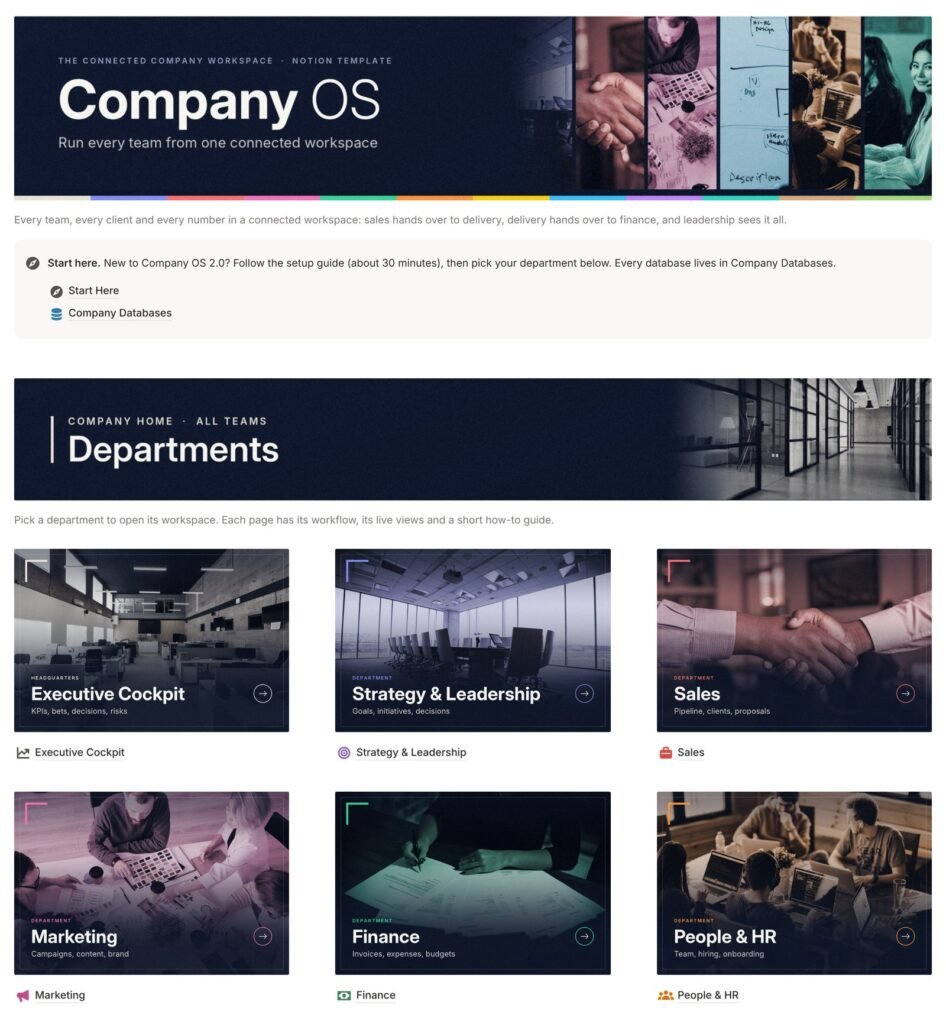
Company OS 2.0 gives each department its own workspace (Sales, Finance, Projects, People, Legal and more) and links them through shared databases. Sales hands over to delivery, delivery hands over to finance, and leadership sees it all from the Executive Cockpit.
$149 $99 · launch price, one-time payment
Your company already has the information. It just doesn’t connect.
Leads sit in a spreadsheet, projects in a task app, invoices in another tool and decisions in somebody’s inbox. Every handover between teams is a copy-and-paste job, and nobody can see the whole picture without asking around.
Handovers get lost
A deal is won, but delivery hears about it late and finance finds out when the client asks for an invoice.
Leadership flies blind
Budget, workload, goals and risks live in different places, so the weekly meeting starts with gathering numbers.
Deadlines slip through
Contract renewals, licence dates and overdue invoices only get noticed after they become a problem.
Know-how walks out the door
Processes live in people’s heads, so answers depend on who happens to be in the office.
Company OS 2.0 links all of this through relations and rollups, so each record is entered once and shows up wherever it matters.
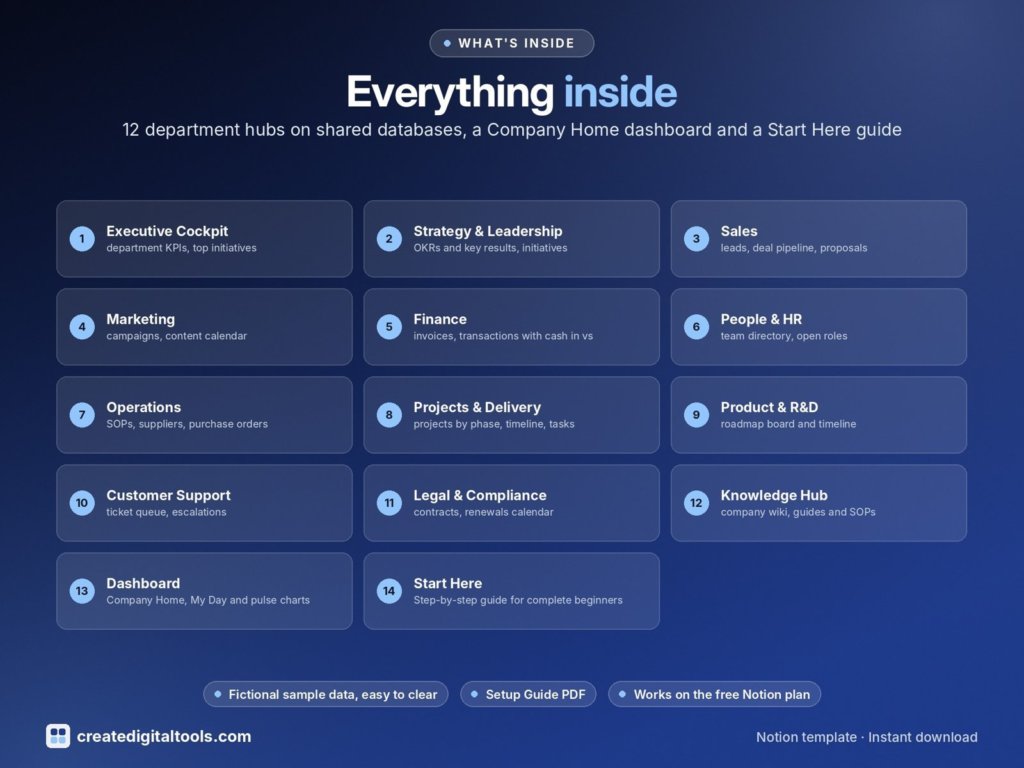
12 areas, each with its own workspace
Every department page has the same layout: a purpose callout, a six-step “How it works” section, live views grouped into sections, and a “Guides & templates” toggle with a step-by-step guide.
Executive Cockpit
Every department on a row with its budget, spend, open invoices, open tasks, goal progress, hours and legal items. Below it: top initiatives, the latest decisions, and a Risks & Watchlist with overdue compliance items, contracts renewing within a month and decisions due for review.
- Departments
- Annual Plan & Initiatives
- Decisions Log
Strategy & Leadership
Quarterly objectives with measurable key results, the year’s initiatives on a timeline, every important decision with context and a review date, and a calendar of leadership and board meetings.
- OKRs
- Key Results
- Annual Plan & Initiatives
- Decisions Log
- Meetings
Sales
A lead board, a deal pipeline by stage, deals closing in the next 30 days, open proposals by expiry, client accounts with lifetime revenue, and reports on lead sources and pipeline value by deal type.
- Leads
- Deals
- Clients
- Proposals & Quotes
- Products & Services
Marketing
A campaign board with budget, spend and leads brought in, a content calendar you can drag to reschedule, a brand library of logos, colours and fonts, and spend and lead-source charts for the monthly review.
- Ad Campaigns
- Social Post Calendar
- Social Content Post
- Social Media Platforms
- Branding and Design
Finance
Invoices by status with an overdue flag, cash in and out by month, payments received, an expense approval board, spend by category, budget against actual per department and monthly pay runs.
- Income and Expense Tracker
- Invoices
- Budget
- Payroll Summary
People & HR
A team directory gallery, open roles and a hiring board, an onboarding timeline and checklist for each new starter, a leave calendar, quarterly reviews and upcoming training.
- Employee Directory
- Job Openings
- Candidates
- Onboarding
- Leave Requests
- Performance Reviews
- Training
- Trainer Details
Operations
Operations SOPs, a supplier directory with payment terms, purchase orders from draft to received, equipment by condition and who has it, stock levels with a reorder flag, and software sorted by renewal date.
- Vendors
- Purchase Orders
- Equipment
- Software & Subscriptions
- Inventory & Stock
Projects & Delivery
Projects by phase and on a timeline, a company-wide task board, a milestone calendar, a time log with hours by type of work, team allocation and every cost line against each project budget.
- Projects
- Tasks
- Milestones
- Time Tracking
- Project Costs
- Team & Resource Matrix
Product & R&D
A roadmap board ranked by RICE score and a roadmap timeline, feature requests linked to the client and ticket that raised them, and releases on a calendar with their notes.
- Product Roadmap
- Feature Requests
- Releases
Customer Support
A ticket queue with priority and type filters, an escalations list of open Urgent and High tickets, CSAT scores and comments with follow-up flags, and help-centre articles pulled from the Knowledge Hub.
- Support Tickets
- CSAT & Feedback
- Knowledge & SOPs
Legal & Compliance
Contracts by status and a renewals calendar, a legal requests board so questions don’t get lost in email, a compliance calendar for licences, insurance and filings, and every company policy with its review date.
- Contracts
- Compliance & Licences
- Legal Requests
Knowledge Hub
A company wiki, step-by-step SOPs and how-to guides, meeting notes with decisions and action items, and a review queue for anything due for a check.
- Knowledge & SOPs
- Meetings
Plus the Company Home page: My Day (your tasks this week, today’s meetings, approvals waiting and overdue invoices), Company pulse charts and Quick add links.
A look inside four departments
Screenshots of the template itself, filled with the sample company. Each department page opens with its purpose, a six-step “How it works” and live views.
Sales
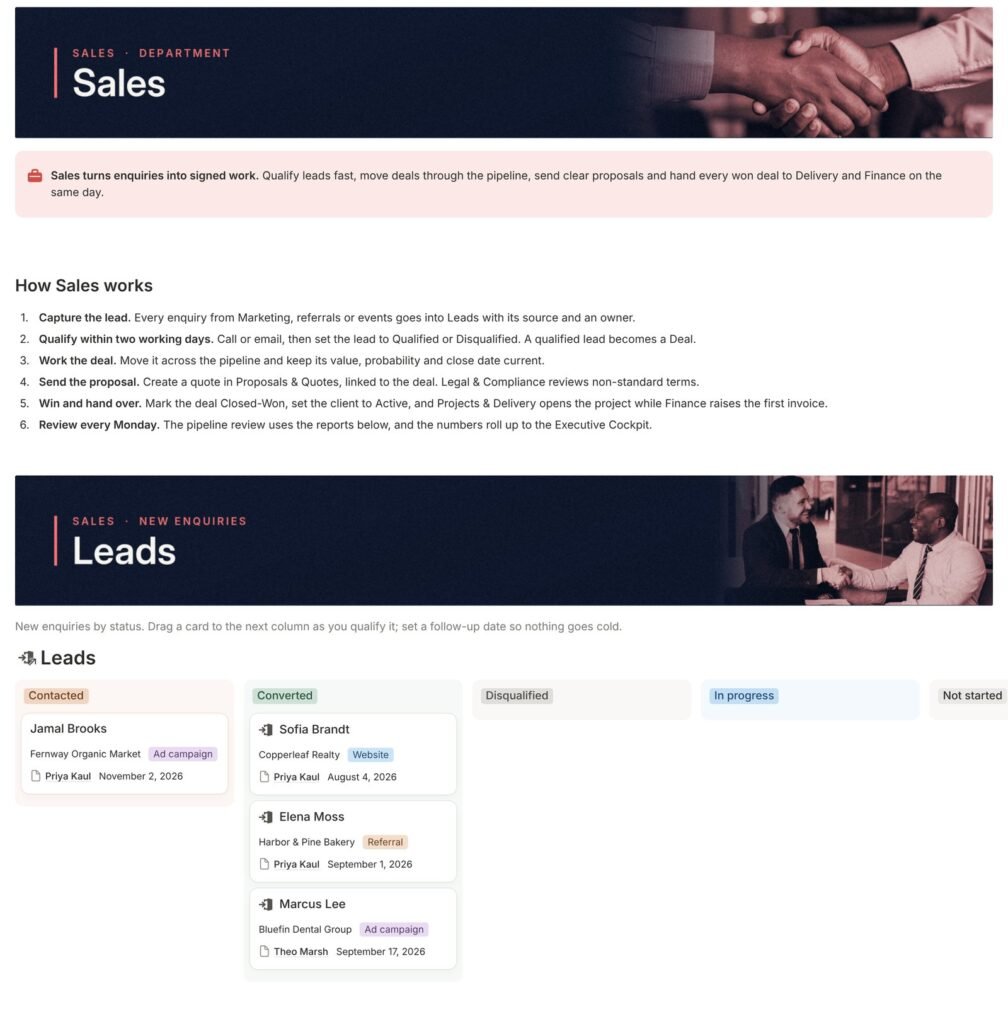
Sales turns enquiries into signed work. Leads are qualified fast, deals move through the pipeline, proposals go out on time and every won deal reaches Delivery and Finance the same day.
- Leads board by status, with source and owner
- Pipeline by deal stage, plus deals closing in the next 30 days
- Proposals still in play, soonest expiry first
- Clients with account manager, lifetime revenue and open invoices
WorkflowLead → qualified deal → proposal → Closed-Won → project and first invoice
Finance
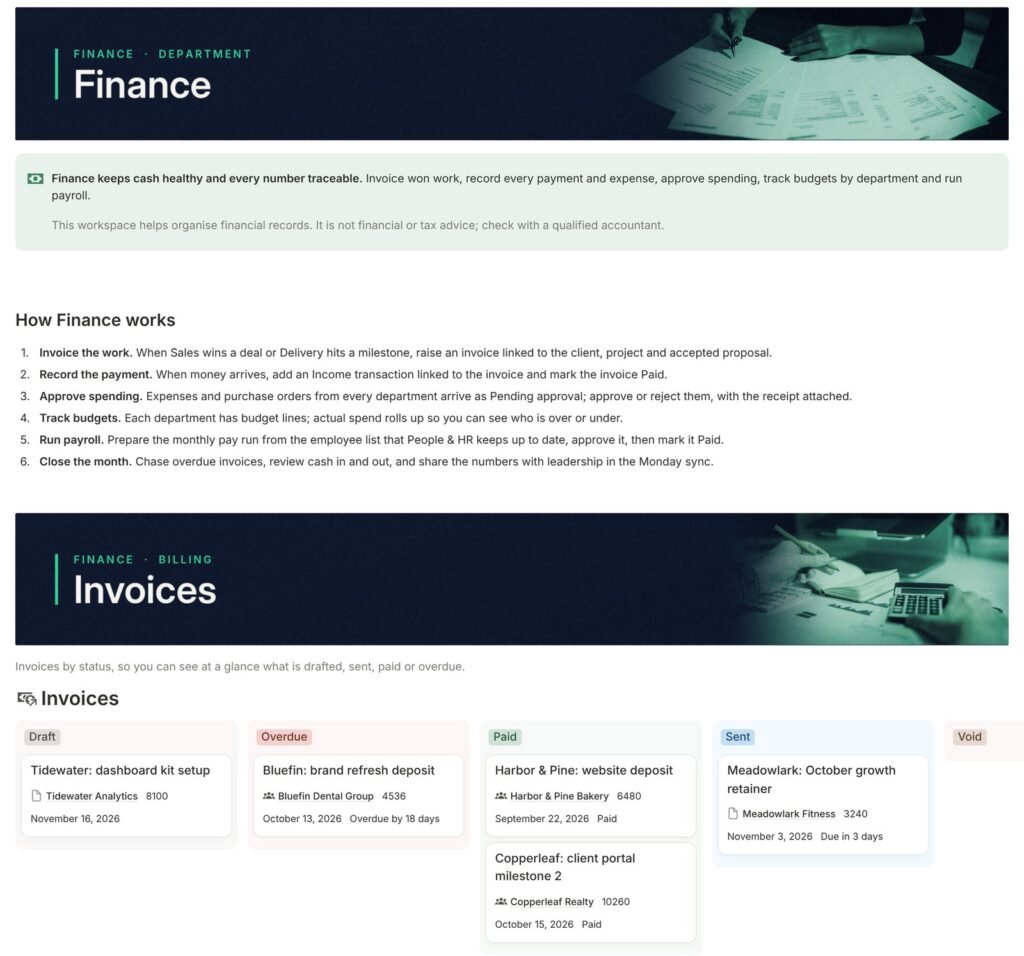
Finance keeps cash healthy and every number traceable: invoice won work, record each payment and expense, approve spending, and track budgets by department.
- Invoices board: Draft, Sent, Overdue, Paid
- Payments money in and out by month
- Expenses waiting for approval, then by category
- Budgets planned against actual spend per department
WorkflowInvoice the work → record the payment → approve spending → close the month
Helps organise financial records. Not financial or tax advice.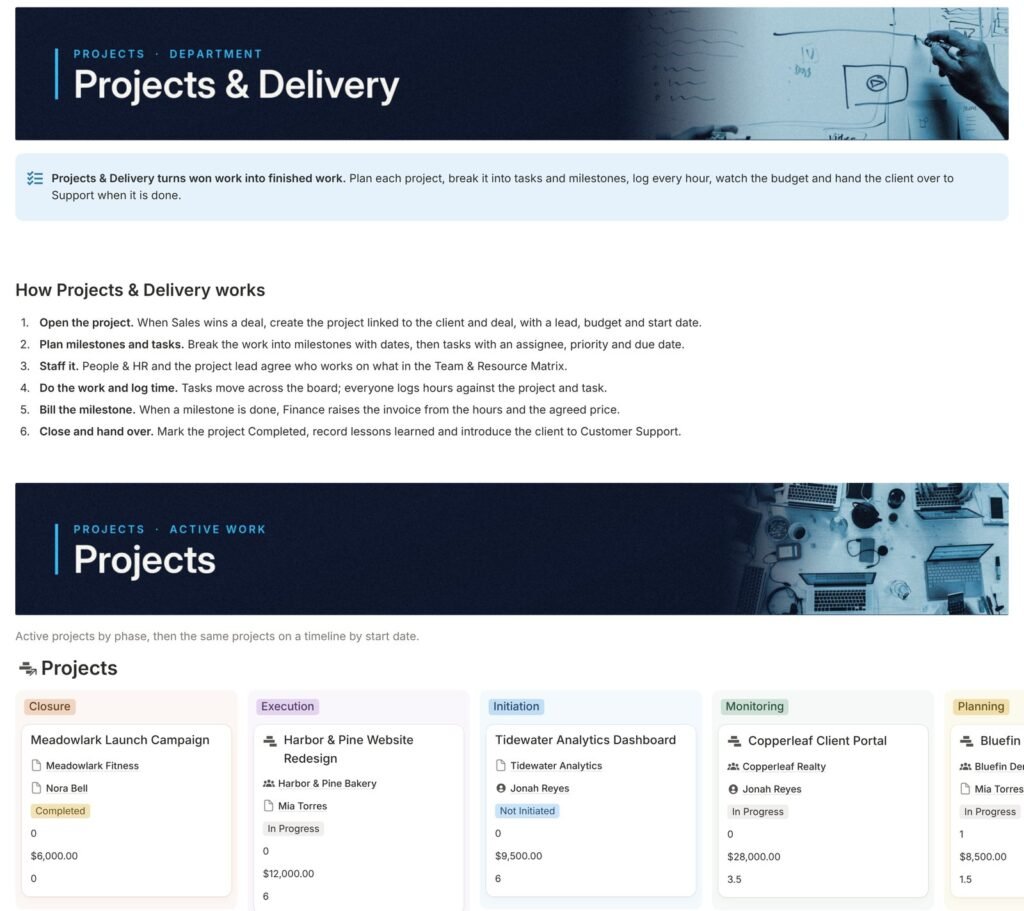
Projects & Delivery
Projects & Delivery turns won work into finished work: plan each project, break it into tasks and milestones, log every hour and watch the budget until handover.
- Projects by phase and on a timeline
- Tasks one company-wide board, filtered by project or person
- Milestones on a calendar that Finance invoices against
- Time & costs hours logged, team allocation and cost lines
WorkflowOpen the project → plan tasks → log time → bill the milestone → hand over
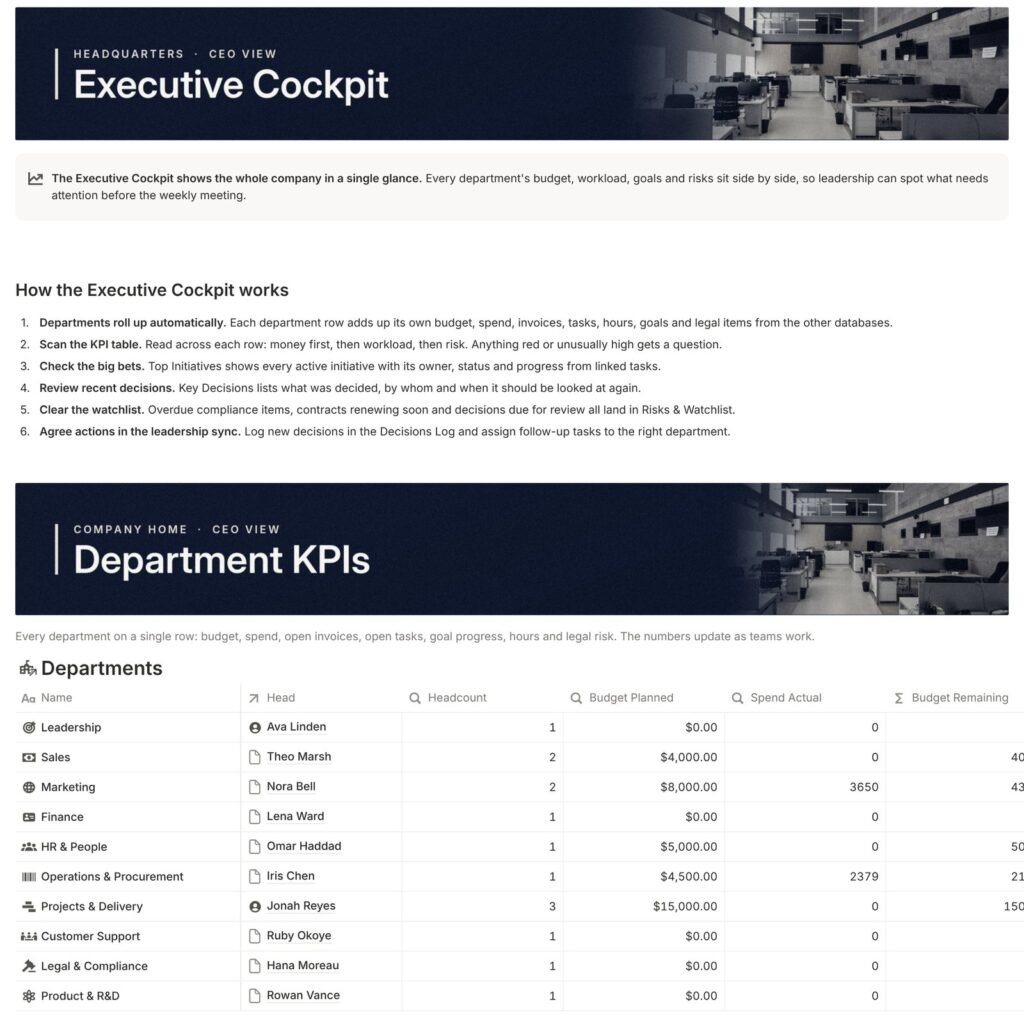
Executive Cockpit
The whole company on one page. Every department sits on a row with its budget, spend, invoices, tasks and goals, so leadership sees what needs attention before the weekly meeting.
- Department KPIs one row per department, filled by rollups
- Top Initiatives with owner, status and progress
- Key Decisions who decided, the impact and a review date
- Risks & Watchlist overdue compliance, renewals and reviews due
WorkflowDepartments roll up → scan the KPIs → review decisions → clear the watchlist
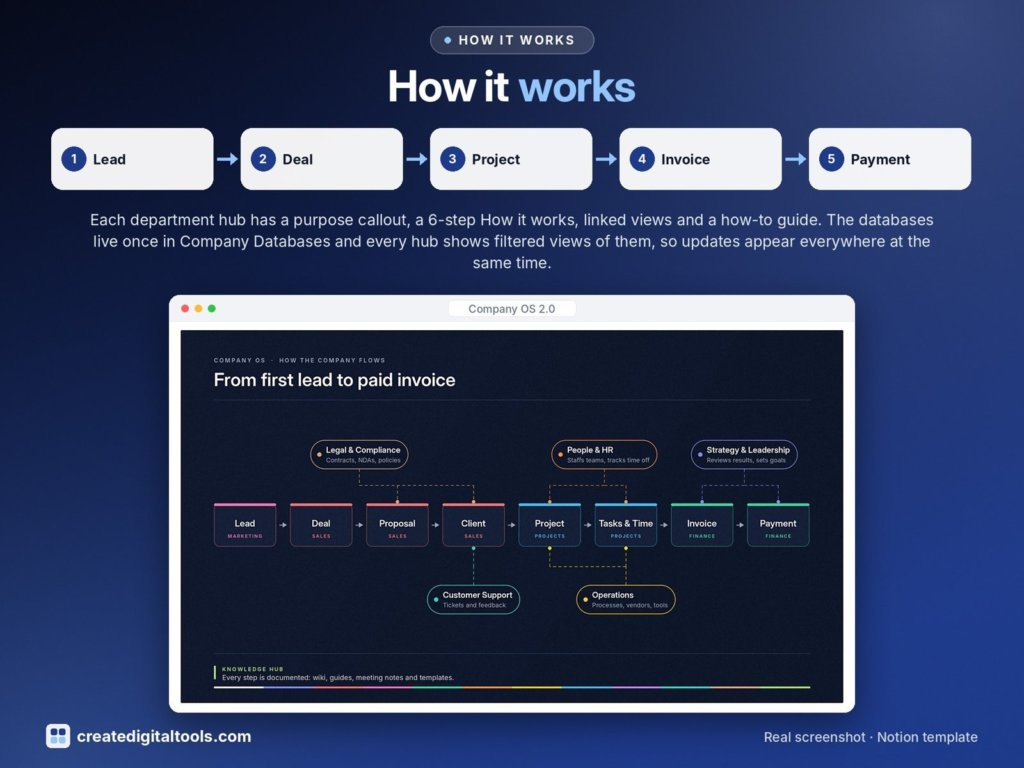
From first lead to paid invoice
Each step is a linked record, so a client page shows its deals, projects, invoices and tickets, and the Executive Cockpit adds it all up.
The Start Here guide walks you through it
Eight steps in order. By the end, the sample company is gone and your own team, clients and numbers are in place.
Duplicate and take the tour
Duplicate the template into your Notion, then scroll the home page and open Sales and Finance. Everything you see is sample data for a fictional company, Northwind Studio Co.
Set up your departments
Rename the Departments rows to match your company, set their order and add a purpose line. Almost every database links to it.
Add your team
Add yourself and your colleagues to the employee directory with their department and manager, then set each department’s head.
Clear the sample data
A checklist tells you which databases to empty in which order, so links and rollups stay clean.
Add your first real records
One real client, one open deal and one live project with a couple of tasks. Check they appear in My Day.
Set your money basics
Add a budget line per department, check the currency on Amount fields and use your own invoice numbering.
Make the views yours
Set the “My tasks due this week” filter to your name and hide any section you don’t need.
Start the weekly rhythm
A weekly leadership meeting from the Executive Cockpit, a monthly finance close and a monthly look at the Knowledge Hub review queue.
Start Here also includes “Your first week”, a five-day checklist, and a short guide for every department.
Built from databases, relations, rollups and formulas
No Notion AI and no paid add-ons. Here is what runs by itself and what your team does.
Automatic
- Rollups and formulas: Budget Remaining, Open Invoices, Hours Logged, Progress %, OKR progress
- Overdue, review, renewal and reorder flags, and notice deadlines
- Filtered views: My Day, Escalations, Risks & Watchlist, Review Queue
- Charts and views refresh as soon as a record changes
- Every new row opens with a starter layout and a link back home
By hand
- Creating records and linking them to their client, project or department
- Moving statuses, for example a deal to Closed-Won or a ticket to Done
- Logging time
- Approving expenses, purchase orders and leave
- Rolling recurring compliance items forward to their next due date
Buttons work on every plan. Database automations depend on your Notion plan, and Notion may limit charts on the Free plan; the tables and boards next to each chart show the same information.
A full tour, plus a video for every department
Each department video follows one real workflow from start to finish, on the sample company.
Company OS 2.0: setup and full tour
For companies with several teams to keep in step
Founders and owners
See budget, pipeline, workload and risks across every department before the weekly meeting.
Service businesses
Agencies, studios and consultancies that win client work, deliver projects, log time and invoice it.
Operations and office managers
Suppliers, purchase orders, equipment, software renewals, leave and onboarding, all linked to the people involved.
Teams already in Notion
Replace scattered pages and one-off databases with a connected structure your whole team can follow.
A good fit if you
- Run (or are building) several departments or functions
- Want handovers between sales, delivery and finance to happen in Notion
- Are happy to spend about 30 minutes on setup
- Want something that works without Notion AI or paid add-ons
Probably not for you if you
- Work alone and only need a simple task or client list
- Need accounting, tax or payroll software that files or pays for you
- Expect it to send emails or sync with your bank by itself
- Have never opened Notion and don’t want to learn the basics
One purchase, every department
The complete template
- 12 department areas with live views, built on 48 connected databases
- Company Home with My Day, Company pulse and Quick add
- Start Here: an 8-step setup guide, sample data checklist and Free plan FAQ
- A step-by-step guide on every department page
- Starter layouts for new records, each with a link back home
- Sample data for a fictional company, Northwind Studio Co., to explore before you start
Before you buy
How do I get the template?
After purchase you get a PDF with the Duplicate link. Open it, sign in to Notion and click Duplicate: a full copy lands in your own workspace, and you can then follow the Start Here page.
Do I need a paid Notion plan?
No. Company OS 2.0 is built only from databases, relations, rollups, formulas and linked views, and needs no Notion AI. Database automations depend on your plan and Notion may limit charts on the Free plan, but the template works fully without them.
Can my whole team use it?
Yes. Invite teammates to your workspace or share individual department pages. Notion’s Free plan has limits for teams (such as file upload size and page history), so check Notion’s plans page if you are inviting several people.
What about the sample data?
The template comes filled with a fictional company, Northwind Studio Co., so you can see how every view works. Start Here has a checklist that clears it in an order that keeps links and rollups clean.
Our company doesn’t have all 12 departments. Is it still useful?
Yes. Rename the Departments rows to match your company and hide any section you don’t need. A small team can run Sales, Projects and Finance first and switch on the rest later.
Can I change fields and views?
Yes. It is a normal Notion workspace. Every database is listed by department on the Company Databases page, where you can add fields or build your own views.
Does it replace my accountant or lawyer?
No. Finance and Legal & Compliance help you organise records and deadlines. They are not financial, tax or legal advice; have a qualified professional check anything important.
Is this made by Notion?
No. Company OS 2.0 is an independent template by Create Digital Tools. It is not affiliated with or endorsed by Notion Labs, Inc.
Give every team a home. Connect them all.
Company OS 2.0 · Notion template · $149 $99 one-time · launch price
New to Notion? Get started with Notion (affiliate link: we may earn a commission at no extra cost to you).
Company OS 2.0 is an independent template by Create Digital Tools. Not affiliated with or endorsed by Notion Labs, Inc. Notion is a trademark of Notion Labs, Inc. Sample data describes a fictional company. Finance and Legal & Compliance areas are organisational tools, not financial, tax or legal advice.